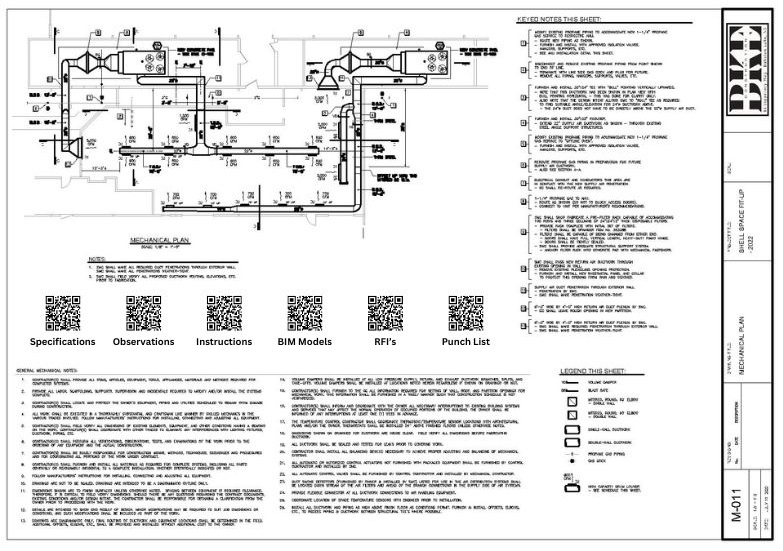
Design drawings are still one of the most important communication tools on a project. They explain intent, coordinate trades, and carry decisions from the design team into the field. But a printed sheet can only hold so much, and the amount of supporting information tied to each drawing keeps growing.
QR codes give architects and engineers a practical way to extend what a drawing can do without cluttering the sheet itself.
Why This Matters for Design Teams
The value of a drawing is no longer limited to the ink on the page. Teams routinely need access to specifications, standard details, BIM content, site observations, cut sheets, turnover requirements, and photo documentation alongside the drawing set.
When that supporting information is hard to reach, two things happen:
- contractors interrupt the design team for documents they should be able to find
- the field works from incomplete context
A QR code on the drawing can close that gap if it links to information that is organized well.
Good Uses for QR Codes on Drawings
The strongest applications are the ones that support active decisions in the field.
Specifications and cut sheets
A code can direct teams to the exact reference material connected to the sheet or detail they are using.
BIM and model coordination
Drawings can point users to model views or digital coordination references when a 2D sheet is not enough on its own.
Standard details and repeat requirements
Instead of repeating large amounts of information across multiple sheets, designers can provide a controlled access point to the current source.
Site observations, photos, and instructions
QR access can help the team retrieve supporting field documentation without digging through email chains.
Closeout and record information
For owner-facing deliverables, QR codes can connect design documentation to the turnover material the project will need later.
What Makes It Better Than Adding More Sheets
The old answer to "we need more information" was usually "issue more pages." That increases document volume without necessarily improving clarity.
QR codes work better when they:
- keep the drawing readable
- reduce repeated document requests
- give contractors faster access to the supporting material behind the drawing
- help the design team control which source is current
That last point matters. The design team should not be chasing down outdated attachments after every revision.
Guardrails for Using QR Codes Well
QR codes on drawings are useful only if the experience behind them is disciplined.
- Label the code clearly so users know what it opens.
- Link to controlled, current information rather than random shared folders.
- Use them where they reduce confusion, not where they add novelty.
- Review them as part of the normal revision process.
Why Architects and Engineers Should Care
Good drawings reduce friction. Better access to supporting information reduces even more of it.
QR codes will not replace good design communication, but they can extend it. Used carefully, they help architects and engineers deliver clearer intent, reduce avoidable field questions, and give the project team a more useful bridge between printed drawings and digital information.